







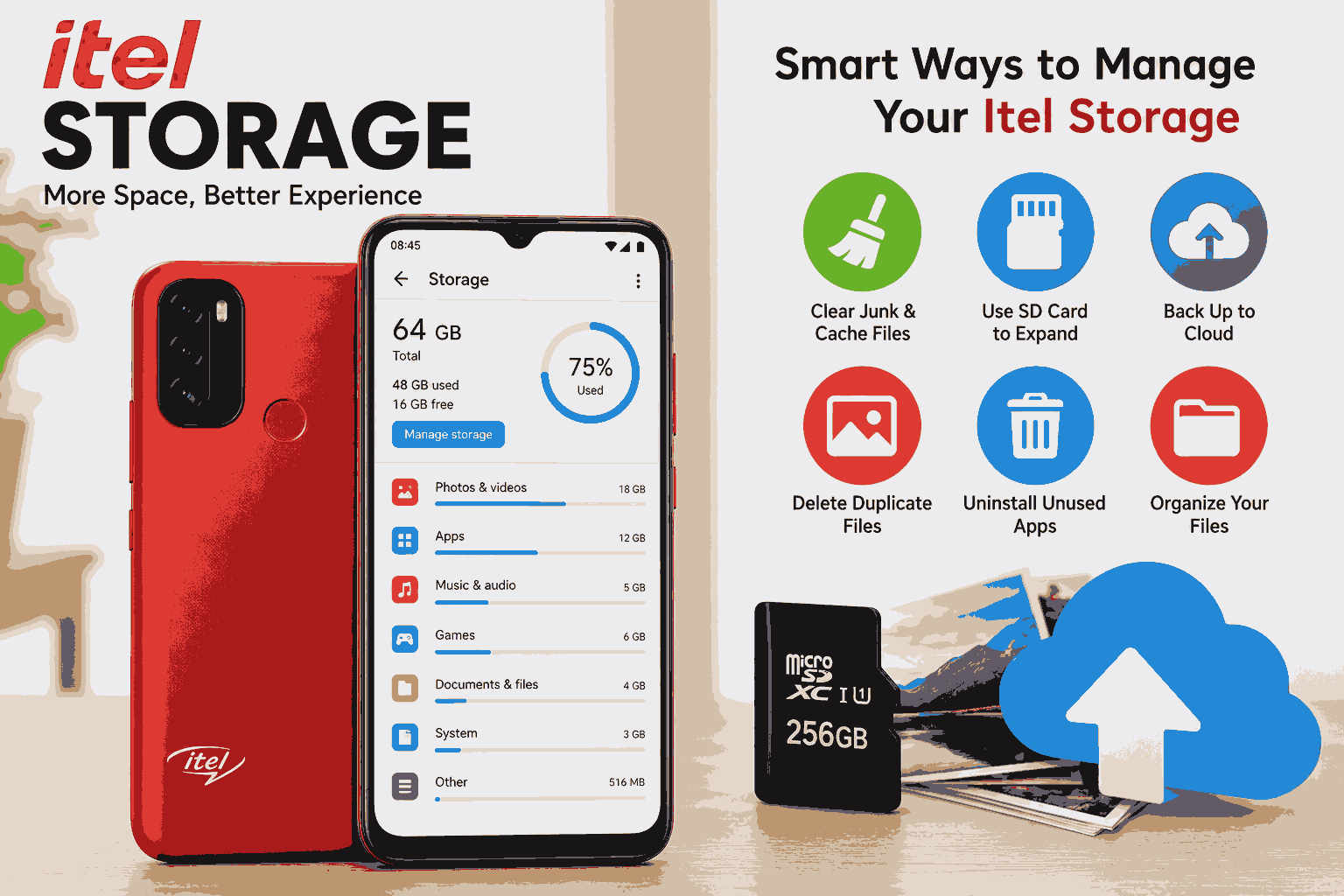
How Much Itel Storage Do You Really Need?
The right itel storage capacity depends on what you actually keep on your phone. A person who mainly makes calls, uses WhatsApp and checks social media has different needs from a student downloading lecture materials, a business owner receiving documents every day, or a creator recording video.
Current Itel models show why buyers should check the exact configuration rather than assuming every phone has the same storage. For example, the Itel A100 is listed with 128GB ROM, while the Power 65 is offered with 128GB and 256GB ROM configurations. Itel also distinguishes ROM from extended RAM, so virtual RAM should not be counted as additional internal storage. citeturn0search1turn0search2
32GB or 64GB for Light Use
Choose a smaller storage option only if you mainly call, message, browse, use a few social apps and take occasional photos. Remember that Android and pre-installed software already occupy part of the advertised capacity.
64GB for Everyday Use
64GB can work well for moderate social media use, banking apps, documents, photos and ordinary downloads. If the phone supports microSD, that can provide additional room for media.
128GB for Heavy Everyday Use
128GB is a better choice if you regularly record video, install larger apps, download offline content or keep many documents. Current Nigerian listings show several Itel models available in 128GB configurations. citeturn0search5turn0search7
256GB for Heavy Storage Users
256GB is useful for people who keep large photo and video libraries, games or creator files. Current Itel models such as the Power 65 and RS4 demonstrate that 256GB is available in the brand’s range. citeturn0search2turn0search4
How to Check the Real Storage Before Buying an Itel Phone
Do not rely only on a seller’s headline such as “8GB RAM” or “128GB phone.” Ask for the exact RAM and ROM configuration. When buying a used or opened device, open Settings > Storage and confirm the capacity shown by the phone. You can also check Settings > About phone for model and memory information where available.
- Confirm the exact model number.
- Confirm physical internal storage.
- Check how much space is already occupied.
- Check whether a microSD card is installed.
- Do not confuse extended RAM with internal storage.
For example, Itel’s Power 65 specification lists 256GB ROM with 12GB RAM made up of 6GB physical RAM plus 6GB extended RAM. That extended RAM does not turn 256GB into a larger physical storage capacity. citeturn0search2
What to Do When Your Itel Phone Has Very Little Free Space
When storage becomes tight, start with the largest categories instead of randomly deleting files. Open the storage breakdown and identify whether apps, videos, images, downloads or other files consume the most space.
- Remove large videos: Back up important recordings before deleting them.
- Review WhatsApp media: Large videos and repeated forwarded files can accumulate quickly.
- Check Downloads: Delete old APKs, ZIP files and documents you no longer need.
- Uninstall unused apps: Remove apps you have not used for months.
- Back up photos: Move older pictures to cloud storage, a computer or another trusted device.
- Empty the trash: Recently deleted files can continue using space until permanently removed.
Use the phone’s own storage controls first rather than installing aggressive “cleaner” applications that promise dramatic performance improvements.
Internal Storage and Memory Cards: Which Should You Depend On?
A microSD card can expand the amount of personal media you carry, but compatibility and supported capacity vary by model. Some applications and system functions may still require internal storage.
Itel’s current product range includes phones with different storage configurations, so check the exact model specification before purchasing a memory card. Itel also provides a support/download area where users can search by phone model, which is useful when confirming device-specific information. citeturn0search0turn0search6
If you are choosing between a phone with more built-in storage and a cheaper phone that depends on an SD card, the larger built-in capacity is usually simpler for long-term use. A memory card is especially useful for photos, videos, music and documents, but important files should still be backed up.
How Nigerian Buyers Can Avoid Fake Storage Claims
Storage specifications can be misunderstood in used-phone and informal-market listings. A seller may quote a larger memory figure without explaining whether it refers to RAM, extended RAM, internal storage or a memory card.
Before paying, compare the seller’s description with the phone’s Settings screen and the manufacturer’s specification page. Current Nigerian listings show Itel phones with different RAM and storage combinations, so “the phone has 128GB” is not enough information by itself. citeturn0search5turn0search7
- Ask for the exact storage configuration.
- Check the phone’s Settings before payment.
- Compare the model and configuration with the manufacturer’s specifications.
- Be cautious if a deal is unusually cheap for the stated storage.
- Test a used phone before paying.
Itel Storage Buying Checklist
Use this checklist when comparing Itel phones in a Nigerian shop, online marketplace or used-phone market:
- What is the exact model?
- How much physical internal storage does it have?
- How much RAM is physical and how much is extended?
- Does the phone support microSD?
- What is the maximum supported memory-card capacity?
- How much internal space is available after the system is installed?
- Is the price difference for a larger storage variant reasonable?
- If used, has the phone been reset and tested?
- Can the seller provide proof of purchase?
For more Nigerian phone-price comparisons, compare this guide with our itel phone price guide, phones under ₦200,000, and phones under ₦40,000.
Tips to Keep Your Itel Storage Healthy for Years
- Review installed apps every month.
- Delete duplicate photos and videos.
- Back up important files.
- Keep a useful amount of internal storage free.
- Empty the Downloads folder regularly.
- Disable unnecessary automatic media downloads.
- Move large videos to supported external storage.
- Restart your phone occasionally.
- Install software updates when enough space is available.
- Avoid downloading files from unknown sources.
Conclusion
Understanding itel storage is essential if you want your smartphone to remain useful as your apps, photos, videos and documents grow. The most important lesson is to check the exact model and physical ROM configuration rather than choosing a phone based only on a RAM figure.
Current Itel phones demonstrate that 128GB and 256GB options are available across several models, while extended RAM can be marketed alongside physical RAM. That makes it especially important for Nigerian buyers to verify the actual specification before payment. citeturn0search1turn0search2turn0search4
If you already own an Itel phone, regular storage maintenance can prevent many problems. Remove unnecessary downloads, review WhatsApp media, back up important files and use a compatible memory card where supported. If you are buying a new phone, choose storage based on how you expect to use it over the next few years rather than only what you need today.
Also Read: Redmi 6GB 128GB 5G: Complete Buying Guide














+ There are no comments
Add yours