







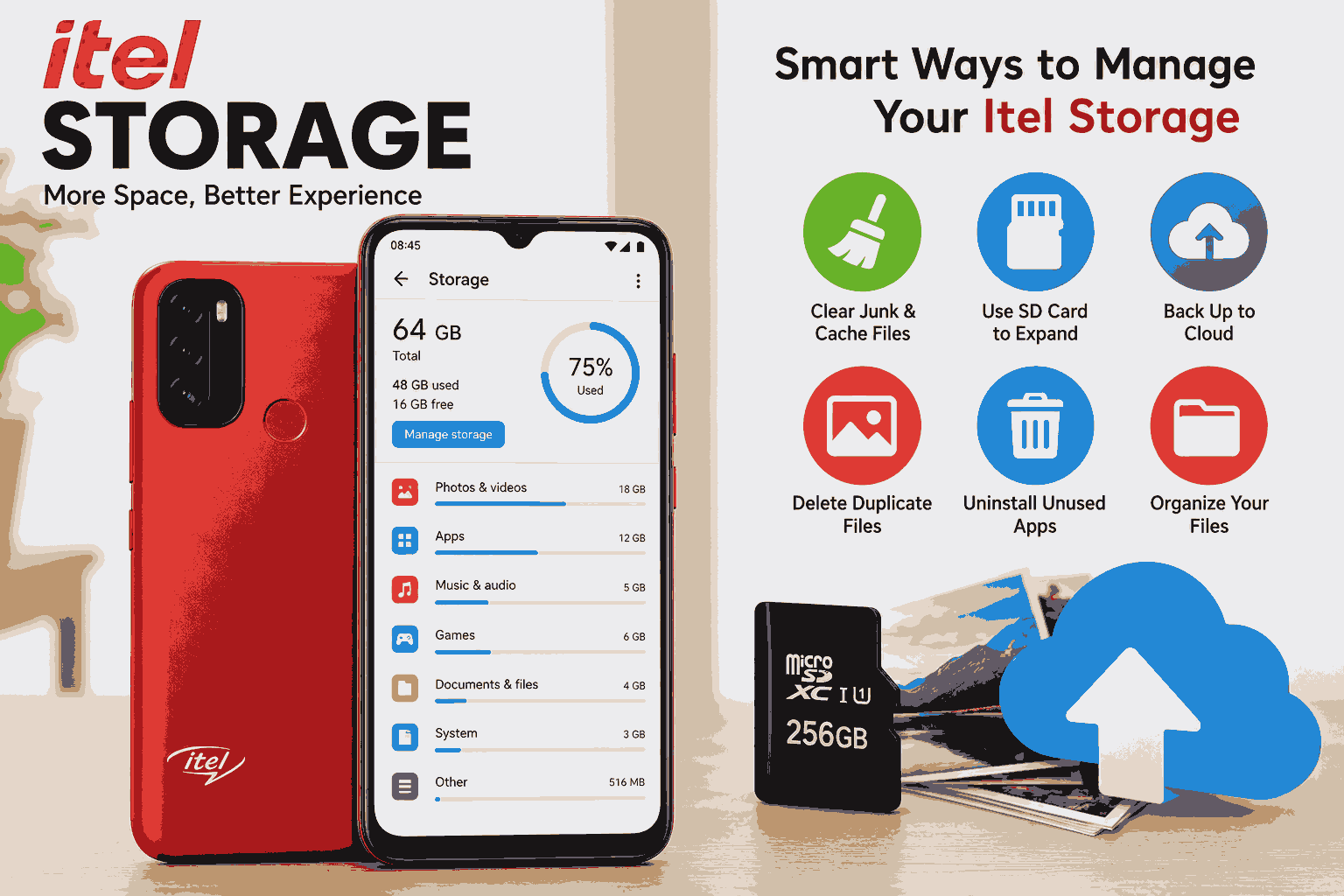
Have you ever received the annoying “Storage Almost Full” notification on your Itel phone? If so, you’re not alone. Itel storage is one of the most searched topics among Itel smartphone users because storage space directly affects how smoothly a phone performs. Whether you’re downloading apps, taking photos, recording videos, or updating software, having enough itel storage is essential for an enjoyable smartphone experience.
In this comprehensive guide, you’ll learn everything you need to know about itel storage, including the different storage capacities available, how Android uses storage, how to check available space, why your phone becomes full, practical ways to free up storage, how to expand storage with SD cards, cloud storage options, and tips to keep your Itel phone running smoothly for years.
Whether you own an Itel A-series, P-series, S-series, Vision series, or another model, this guide will help you make the most of your itel storage.
What Is Itel Storage?
Itel storage refers to the amount of space available on an Itel smartphone for saving apps, photos, videos, music, documents, downloaded files, and the Android operating system itself.
Unlike RAM, which temporarily stores information while apps are running, storage keeps your files permanently until you delete them.
When purchasing an Itel smartphone, one of the most important specifications you’ll notice is the storage capacity. Common examples include:
- 32GB
- 64GB
- 128GB
- 256GB
Some premium Itel models also support storage expansion through microSD cards, allowing users to save even more files.
Without sufficient itel storage, you may experience:
- Slow phone performance
- Failed app installations
- Inability to receive WhatsApp media
- Camera errors
- Failed software updates
- Frequent storage warnings
That’s why understanding how itel storage works is essential for every Itel smartphone owner.
Why Itel Storage Matters
Many smartphone users focus on the camera or battery when buying a device, but storage deserves just as much attention.
Here are several reasons why itel storage is important.
Installing Applications
Every app occupies storage space. While lightweight apps may only require a few megabytes, games and professional applications can consume several gigabytes.
Popular examples include:
| Application | Estimated Size |
|---|---|
| 150–500 MB | |
| 300–700 MB | |
| 400 MB+ | |
| TikTok | 500 MB+ |
| Call of Duty Mobile | 10 GB+ |
| PUBG Mobile | 8 GB+ |
If your itel storage is nearly full, installing new apps becomes difficult.
Saving Photos and Videos
Modern Itel smartphones come equipped with increasingly capable cameras.
Each photo you capture occupies storage.
High-resolution videos consume even more space.
Approximate storage usage:
- Photo: 3–8 MB
- HD Video (1 minute): 60–100 MB
- Full HD Video (1 minute): 120–200 MB
After a few months of everyday use, your gallery alone can occupy several gigabytes of itel storage.
Software Updates
Android updates require additional temporary storage before installation.
If there isn’t enough free itel storage, updates may fail, leaving your phone without the latest security improvements and features.
Better Performance
A nearly full storage drive affects overall phone performance.
Your Itel phone may begin to:
- Freeze
- Restart unexpectedly
- Lag while opening apps
- Take longer to boot
- Respond slowly to touch
Maintaining free itel storage helps your device run more efficiently.
Downloading Files
Whether you’re downloading PDFs, Word documents, ZIP files, music, movies, or educational materials, they all consume storage space.
Students and professionals especially benefit from larger storage capacities because they often keep numerous documents on their phones.
Types of Storage Found in Itel Smartphones
Understanding the different types of storage helps you choose the right device and manage it effectively.
1. Internal Storage
Internal storage is built directly into the phone.
This is where Android stores:
- Apps
- Photos
- Videos
- Downloads
- System files
- Contacts (if saved locally)
Internal storage cannot usually be replaced, making it the primary form of itel storage.
2. Expandable Storage
Many Itel smartphones support microSD cards.
A microSD card allows you to store:
- Music
- Photos
- Movies
- Documents
- Offline videos
Some Itel devices support cards up to:
- 128GB
- 256GB
- 512GB
- 1TB (model dependent)
Always check your phone’s specifications before purchasing a memory card.
3. Cloud Storage
Cloud storage stores your files online instead of on your phone.
Popular cloud services include:
- Google Drive: https://drive.google.com
- Google Photos: https://photos.google.com
- Microsoft OneDrive: https://onedrive.live.com
- Dropbox: https://www.dropbox.com
Cloud storage helps preserve itel storage by allowing you to back up photos, videos, and documents securely over the internet.
4. Cache Storage
Android automatically stores temporary files known as cache.
Examples include:
- Browser images
- App thumbnails
- Temporary downloads
- Streaming data
Although cache improves app speed, excessive cached data can consume a surprising amount of itel storage over time.
Common Itel Storage Capacities
Itel manufactures smartphones for users with different budgets and needs. As a result, storage capacities vary across models.
| Storage Capacity | Best For |
|---|---|
| 16GB | Very light users |
| 32GB | Basic smartphone tasks |
| 64GB | Average users |
| 128GB | Heavy app users |
| 256GB | Power users and gamers |
Let’s explore each option.
16GB Storage
Older or entry-level Itel phones may come with 16GB of storage.
Suitable for:
- Calling
- SMS
- Light browsing
Limitations:
- Fills quickly
- Limited apps
- Frequent cleanup required
32GB Storage
A 32GB device is suitable for:
- Students
- Casual users
- Social media
- Basic photography
However, after Android and system files are installed, only about 20–24GB may remain available for personal use.
64GB Storage
This is one of the most balanced storage options available today.
Benefits include:
- More applications
- Thousands of photos
- Several HD videos
- Better multitasking
- Less frequent storage warnings
Many modern Itel smartphones now feature 64GB of internal itel storage.
128GB Storage
Ideal for users who:
- Record many videos
- Install large games
- Use editing apps
- Store movies
- Keep offline maps
This capacity offers excellent flexibility for everyday use.
256GB Storage
Although less common on budget phones, some higher-end smartphones offer 256GB of storage.
Advantages include:
- Extensive media libraries
- Professional photography
- Large game collections
- Thousands of documents
- Minimal storage management
For most users, 256GB provides more than enough itel storage for years of use.
Understanding Internal Storage vs RAM
Many people confuse RAM with storage, but they serve entirely different purposes.
| Feature | Storage | RAM |
|---|---|---|
| Stores files permanently | ✔ | ✘ |
| Stores installed apps | ✔ | ✘ |
| Runs apps temporarily | ✘ | ✔ |
| Can become full | ✔ | ✔ |
| Usually expandable | Sometimes | Rarely |
Storage
Storage is like a filing cabinet.
Everything you save stays there until you remove it.
Examples include:
- Photos
- Videos
- Music
- Apps
- Documents
RAM
RAM works more like a workspace on your desk.
It temporarily holds data while apps are running.
When you close an app or restart your phone, RAM is cleared.
Having more RAM improves multitasking, while having more itel storage allows you to save more content.
What Uses Storage on an Itel Phone?
Many users wonder why their itel storage becomes full even if they haven’t installed many apps. The answer lies in how modern smartphones store different types of data.
Here are the biggest storage consumers:
Apps
Every installed app occupies space, and over time, apps grow larger due to updates and additional data.
App Data
Apps such as WhatsApp, Facebook, Instagram, and Telegram store cached images, videos, voice notes, and documents, which can accumulate over months of use.
Photos
Modern smartphone cameras produce high-quality images, each taking up several megabytes. Large photo libraries can consume significant storage.
Videos
Videos are among the largest file types on any smartphone. Even short clips recorded in high resolution can quickly fill available space.
Downloads
Files downloaded from browsers, messaging apps, and email attachments often remain in the Downloads folder long after they’ve been used.
Music and Podcasts
Offline playlists, podcasts, and downloaded audio files also contribute to storage usage.
Documents
PDFs, Word files, presentations, spreadsheets, and eBooks may seem small individually, but together they can occupy a noticeable amount of storage.
System Files
The Android operating system, security patches, and pre-installed apps require dedicated storage space that cannot usually be removed.
How to Check Itel Storage Space
Monitoring your itel storage regularly helps prevent performance issues and storage warnings.
To check available storage on most Itel smartphones:
- Open Settings.
- Tap Storage or Storage & Memory (the name may vary by Android version).
- View the total storage, used storage, and available space.
- Review the storage breakdown to see how much space is being used by apps, photos, videos, audio, documents, and system files.
This information allows you to identify which categories are consuming the most storage so you can decide what to clean up or move to a microSD card or cloud service.
Why Itel Storage Gets Full Quickly
Even if you don’t intentionally save many files, itel storage can fill up faster than expected. Some of the most common reasons include:
- Pre-installed system apps: Android and built-in applications occupy part of the storage before you even start using the phone.
- App updates: Apps receive regular updates that often increase their size over time.
- Messaging apps: WhatsApp, Telegram, and Messenger automatically download photos, videos, stickers, and voice notes.
- Cached data: Apps store temporary files to improve performance, but these files can accumulate into gigabytes.
- High-resolution media: Photos and Full HD videos consume much more space than older media formats.
- Offline downloads: Music, Netflix shows, YouTube offline videos, and maps all use local storage.
- Duplicate files: Downloading the same document or image multiple times creates unnecessary clutter.
- Forgotten downloads: Many users never clear their Downloads folder, allowing old files to pile up.
Understanding these causes is the first step toward managing your itel storage effectively and keeping your phone running smoothly.
How to Free Up Itel Storage Without Losing Important Files
Running out of itel storage doesn’t always mean you need to buy a new phone. In many cases, a few simple maintenance steps can recover several gigabytes of space while keeping your important files safe.
Below are the most effective methods for freeing up itel storage.
Delete Unused Applications
Many users install apps for temporary purposes and forget to remove them. These unused apps continue to occupy valuable storage and may also store cached data in the background.
To uninstall unused apps:
- Open Settings.
- Tap Apps or App Management.
- Select an app you no longer use.
- Tap Uninstall.
Review your installed apps every few months to remove anything you no longer need.
Clear App Cache
Cached files help apps load faster, but they can build up over time and consume a significant amount of itel storage.
To clear an app’s cache:
- Open Settings.
- Go to Apps.
- Select the desired app.
- Tap Storage & Cache.
- Choose Clear Cache.
Focus on apps like:
- Chrome
- TikTok
- YouTube
Tip: Avoid using Clear Data unless necessary, as it may remove app settings or require you to log in again.
Remove Duplicate Photos and Videos
Many people unknowingly save the same photo or video multiple times through messaging apps or downloads.
Look for duplicates in:
- Camera folder
- WhatsApp Images
- Screenshots
- Downloads
- Bluetooth folder
Deleting duplicate media can quickly recover hundreds of megabytes or even several gigabytes of itel storage.
Empty the Downloads Folder
The Downloads folder often contains files that have already served their purpose.
Examples include:
- PDFs
- ZIP files
- APK installers
- Images
- Audio files
- Documents
Review this folder regularly and delete anything you no longer need.
Back Up Photos to the Cloud
If your gallery is taking up most of your itel storage, consider backing up your photos to a cloud service.
After confirming the backup is complete, you can safely remove local copies from your phone to free up space.
Popular options include:
- Google Photos
- Google Drive
- Microsoft OneDrive
- Dropbox
Cloud backups also protect your memories if your phone is lost, stolen, or damaged.
Delete Old Screen Recordings
Screen recordings are often much larger than regular photos.
A five-minute recording can consume hundreds of megabytes depending on the resolution.
Check your gallery for:
- Tutorials
- Gameplay recordings
- Meeting recordings
- Temporary videos
Delete any that are no longer needed.
Manage WhatsApp Storage
WhatsApp is one of the biggest contributors to full itel storage because it automatically saves media from chats and groups.
To reduce WhatsApp storage:
- Open WhatsApp.
- Tap Settings.
- Select Storage and Data.
- Tap Manage Storage.
Here you can remove:
- Large videos
- Forwarded files
- Duplicate images
- Old voice notes
- Unnecessary documents
Disabling automatic media downloads can also help prevent future storage issues.
How to Expand Itel Storage Using a MicroSD Card
One of the biggest advantages of many Itel smartphones is support for expandable storage through a microSD card.
A microSD card provides additional space for your files without replacing your phone.
Benefits include:
- More room for photos and videos
- Storage for music and movies
- Space for downloaded documents
- Reduced pressure on internal itel storage
Choosing the Right Memory Card
When purchasing a microSD card, consider:
- Capacity
- Speed
- Brand
- Compatibility
Common capacities include:
| Capacity | Best For |
|---|---|
| 32GB | Everyday users |
| 64GB | Students and professionals |
| 128GB | Heavy media users |
| 256GB | Gamers and creators |
| 512GB | Advanced users |
Choose a reputable brand for better reliability and performance.
How to Insert a Memory Card
Although the exact process varies by model, the general steps are:
- Turn off your phone.
- Remove the SIM tray or back cover (depending on the device).
- Insert the microSD card into the correct slot.
- Restart the phone.
- Follow any on-screen prompts to set up the card.
Once installed, your phone should detect the new storage automatically.
Move Photos to the SD Card
To free internal itel storage:
- Open the File Manager.
- Navigate to the DCIM or Pictures folder.
- Select the photos or videos.
- Tap Move.
- Choose the SD card as the destination.
This is one of the easiest ways to recover internal storage without deleting memories.
Save Camera Photos Directly to the SD Card
Many Itel phones allow you to change the default storage location for photos.
If supported:
- Open the Camera app.
- Go to Camera Settings.
- Locate Storage Location.
- Select SD Card.
New photos and videos will then be saved directly to the memory card, helping preserve internal itel storage.
Cloud Storage vs. Local Storage
When managing itel storage, it’s helpful to understand the difference between local and cloud storage.
| Feature | Local Storage | Cloud Storage |
|---|---|---|
| Internet required | No | Usually Yes |
| Accessible offline | Yes | Limited |
| Backup protection | No | Yes |
| Available on multiple devices | No | Yes |
| Risk if phone is damaged | Higher | Lower |
Advantages of Local Storage
Local storage offers:
- Faster access
- Offline availability
- No internet required
- Better for frequently used files
However, if your phone is lost or damaged, locally stored files may also be lost unless you have a backup.
Advantages of Cloud Storage
Cloud storage offers:
- Automatic backups
- Easy file sharing
- Access from multiple devices
- Protection against hardware failure
Many users choose a combination of local and cloud storage for the best balance of convenience and security.
Common Itel Storage Problems and Their Solutions
Even with careful management, users may encounter storage-related issues. Here are some common problems and practical solutions.
“Storage Almost Full”
Possible causes:
- Too many apps
- Large media files
- Cached data
- Downloads folder clutter
Solution:
- Delete unnecessary files.
- Clear app cache.
- Move media to an SD card.
- Back up photos to the cloud.
Unable to Install Apps
Possible causes:
- Insufficient internal itel storage
- Corrupted cache
- Oversized app updates
Solution:
- Free internal storage.
- Restart the phone.
- Clear the Google Play Store cache.
- Retry the installation.
Camera Cannot Save Photos
If your camera displays an error when taking pictures, storage may be full.
Solution:
- Delete unwanted media.
- Move files to an SD card.
- Ensure the SD card is properly inserted and has available space.
Phone Running Slowly
A phone with very little free storage often becomes sluggish.
Solution:
- Keep at least 10–20% of your internal itel storage free.
- Remove unused apps.
- Restart the device regularly.
- Update your software when available.
SD Card Not Detected
If your phone doesn’t recognize the memory card:
- Reinsert the card.
- Test it in another device.
- Clean the card’s contacts gently.
- Format the card (after backing up any important data).
- Replace the card if it’s damaged.
Advanced Tips for Managing Itel Storage
Once you’ve handled the basics, these advanced strategies can help you keep itel storage organized over the long term.
Organize Files into Folders
Create folders for:
- Work
- School
- Photos
- Videos
- Music
- Documents
A tidy file system makes it easier to find and remove unnecessary files.
Use Lite Versions of Apps
Many popular apps offer lighter versions that consume less storage and data.
Examples include:
- Facebook Lite
- Messenger Lite (where available)
- Google Go
- Maps Go
These apps can help save both storage space and system resources.
Delete APK Files After Installation
If you install apps manually using APK files, remember to delete the installer afterward.
Keeping old APK files wastes valuable itel storage.
Review Storage Monthly
Set a reminder once a month to:
- Clear cache
- Delete duplicates
- Remove unused downloads
- Organize files
- Uninstall apps you no longer use
Regular maintenance helps prevent sudden storage shortages.
Avoid Saving Everything Offline
Streaming services often allow offline downloads, but these files can consume several gigabytes.
If you rarely revisit downloaded content, remove it after watching or listening.
Restart Your Phone Occasionally
Restarting your phone clears temporary system processes and can improve overall performance, especially after freeing up storage.
Best Storage Practices for Different Types of Users
Different users have different storage needs. Here are some recommendations based on common usage patterns.
Students
Students often store:
- Lecture notes
- PDFs
- Presentations
- Educational videos
Tips:
- Use cloud storage for documents.
- Keep textbooks organized in folders.
- Delete outdated assignments.
Business Professionals
Professionals may keep:
- Contracts
- Reports
- Email attachments
- Presentation files
Tips:
- Back up important documents regularly.
- Encrypt sensitive files where possible.
- Remove duplicate versions of documents.
Mobile Gamers
Games are among the largest apps available.
Tips:
- Keep only the games you actively play.
- Clear game cache when appropriate.
- Move supported game data to an SD card if the device allows it.
Photography Enthusiasts
If you frequently capture photos and videos:
- Enable automatic cloud backup.
- Transfer older media to a computer or external drive.
- Save new photos directly to an SD card when supported.
These habits help ensure your itel storage remains available for new memories.
How to Choose the Right Itel Storage Capacity Before Buying
Choosing the right itel storage is one of the most important decisions you’ll make when purchasing a new smartphone. While processors, cameras, and battery capacity are important, your storage size determines how many apps, photos, videos, and documents you can keep without constantly deleting files.
Below is a simple guide to help you select the right storage option based on your usage.
Choose 32GB If You Are a Light User
A phone with 32GB of itel storage is suitable if you mainly use your device for:
- Phone calls
- Text messaging
- Light web browsing
- Occasional photography
Keep in mind that the Android operating system and pre-installed apps already occupy part of the internal storage, leaving less space for personal files.
Choose 64GB for Everyday Use
For most users, 64GB of itel storage provides an excellent balance between affordability and functionality.
This capacity comfortably supports:
- Social media apps
- Banking apps
- Moderate gaming
- Thousands of photos
- Several hours of HD videos
- School or office documents
It is one of the most recommended storage options for students and average smartphone users.
Choose 128GB If You Store Lots of Files
If you frequently record videos, download movies, or install large applications, 128GB of itel storage is a smarter investment.
It is ideal for:
- Content creators
- Mobile gamers
- Business users
- University students
- Travelers who store offline maps and media
With this much storage, you’ll spend less time worrying about deleting files.
Choose 256GB for Heavy Usage
Although less common in budget smartphones, 256GB of itel storage is perfect for users who want maximum flexibility.
It is suitable for:
- Professional photographers
- Video editors
- Heavy gamers
- Users with extensive music or movie collections
If your budget allows, choosing a larger storage option can also make your phone more future-proof.
Signs That Your Itel Storage Needs Cleaning
Many users don’t realize their storage is nearly full until they receive an error message. Watch out for these warning signs:
- Your phone becomes noticeably slower.
- Apps take longer to open.
- The camera fails to save new photos or videos.
- Software updates fail to install.
- You receive repeated “Storage Almost Full” notifications.
- New apps cannot be installed.
- Messaging apps stop downloading media automatically.
If you notice any of these issues, it’s time to review your itel storage and remove unnecessary files.
Common Myths About Itel Storage
There are many misconceptions about smartphone storage. Let’s separate fact from fiction.
Myth 1: Deleting Photos Permanently Frees Storage Immediately
Fact: Deleted photos often remain in the “Recently Deleted” or “Trash” folder for up to 30 days. Empty this folder to recover storage space.
Myth 2: More RAM Means More Storage
Fact: RAM and storage are different components.
- RAM helps run apps.
- Storage saves files permanently.
Buying a phone with more RAM does not increase available itel storage.
Myth 3: Clearing Cache Deletes Your Personal Files
Fact: Clearing cache removes temporary files only. Your photos, videos, contacts, and documents remain intact.
Myth 4: An SD Card Makes the Phone Faster
Fact: A microSD card increases available storage, but it does not improve the processor’s speed or overall performance. However, moving large media files to an SD card can free internal itel storage, which may help the phone operate more smoothly.
Myth 5: You Never Need to Clean Storage
Fact: Every smartphone benefits from regular maintenance. Periodically deleting unused files and clearing cache helps maintain good performance.
Tips to Keep Your Itel Storage Healthy for Years
Good storage habits can prevent many common smartphone problems.
Here are some best practices:
- Review installed apps every month.
- Delete duplicate photos and videos.
- Back up important files to cloud storage or a computer.
- Keep at least 10–20% of internal storage free.
- Empty the Downloads folder regularly.
- Disable automatic downloads in messaging apps if unnecessary.
- Move large videos to an SD card when supported.
- Restart your phone occasionally.
- Install software updates when sufficient storage is available.
- Avoid downloading files from unknown or untrusted sources.
Following these habits will help your itel storage remain organized and improve your phone’s long-term performance.
Frequently Asked Questions About Itel Storage
Does Itel support expandable storage?
Many Itel smartphones include a dedicated or shared microSD card slot, allowing you to expand storage. However, the maximum supported capacity varies by model, so check your device specifications before purchasing a memory card.
Why is my Itel phone showing less storage than advertised?
The advertised storage includes space used by the Android operating system, system files, and pre-installed applications. As a result, the available storage shown after setup is always less than the total capacity.
Can I move all apps to an SD card?
No. While some Android apps support being moved to an SD card, many system apps and certain third-party applications must remain in internal storage for proper functionality.
Is cloud storage better than internal storage?
Both have advantages. Internal storage provides fast offline access, while cloud storage offers backup protection and access across multiple devices. Using both together is often the best solution.
How much free storage should I keep?
It’s generally recommended to keep at least 10–20% of your internal itel storage free. This helps Android manage temporary files efficiently and can improve overall performance.
Conclusion
Understanding itel storage is essential if you want your smartphone to remain fast, reliable, and capable of handling your daily tasks. Whether you own an entry-level Itel device with 32GB of storage or a newer model offering 128GB or more, managing your storage wisely can significantly improve your overall experience.
Throughout this guide, we’ve explored what itel storage is, the different storage capacities available, the distinction between storage and RAM, common reasons storage fills up, and practical ways to free up space. We’ve also discussed how microSD cards and cloud storage can complement your phone’s internal memory, helping you store more files without compromising performance.
The key to maintaining healthy itel storage is developing good habits. Regularly deleting unnecessary files, clearing app cache, backing up important media, organizing folders, and keeping sufficient free space will ensure your Itel phone continues to perform efficiently over time.
If you’re planning to purchase a new Itel smartphone, consider your future storage needs rather than just your current usage. Choosing a device with adequate storage or one that supports expandable storage can save you from frequent cleanup sessions and give you a smoother, more enjoyable mobile experience.
By following the recommendations in this guide, you’ll be well-equipped to make the most of your itel storage, protect your important files, and keep your smartphone running at its best for years to come.
FAQs
1. What is the best Itel storage size for most users?
For most people, 64GB of itel storage is sufficient for everyday use, including social media, photos, videos, and common applications. Users who install many games or record lots of videos may benefit from 128GB or more.
2. How can I increase the storage on my Itel phone?
You can increase available space by using a compatible microSD card, moving media files to the card, deleting unused apps, clearing cache, and backing up files to cloud storage services like Google Drive or Google Photos.
3. Why does my Itel phone keep saying “Storage Almost Full”?
This message usually appears because apps, cached data, photos, videos, downloads, or system files have consumed most of your available storage. Cleaning unnecessary files and maintaining free space can resolve the issue.














+ There are no comments
Add yours